MD307 Digital watch face
Matteo Dini MD ® Watch FacesPersonalization
4.41.94K Reviews
- Version
- Varies With Device
- Installs
- 100.00K
- Age Rating
- Everyone
Screenshots
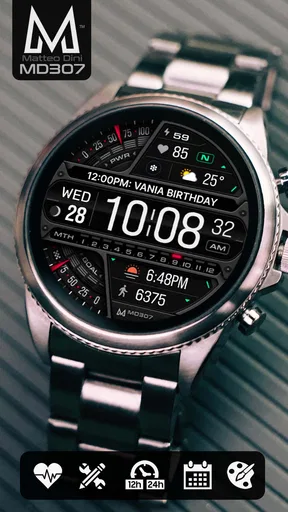
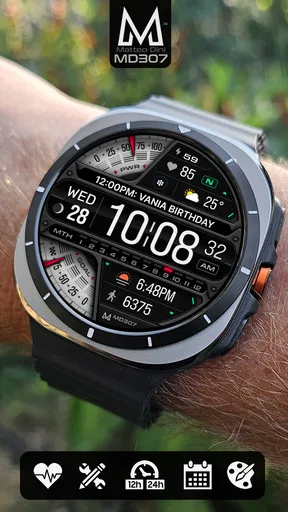
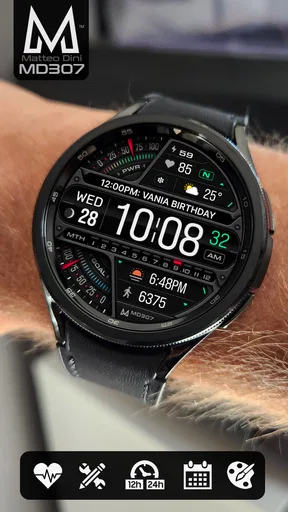
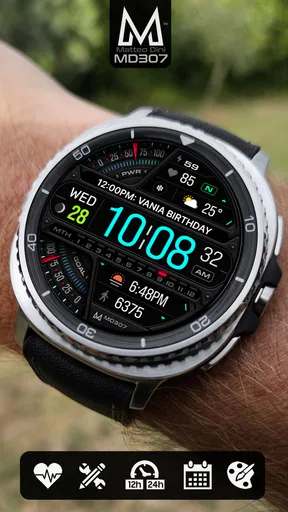
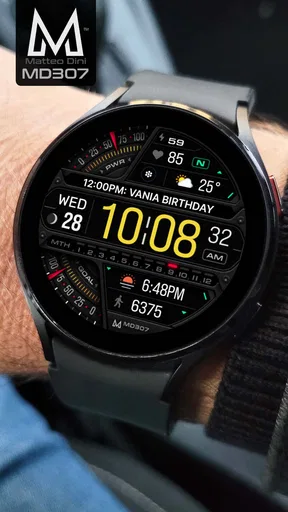
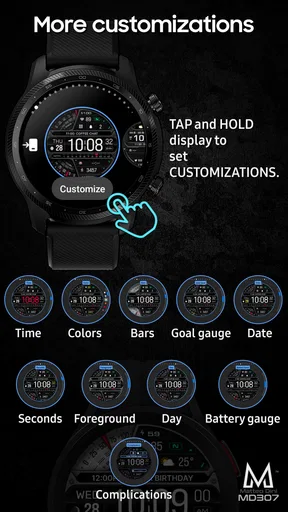
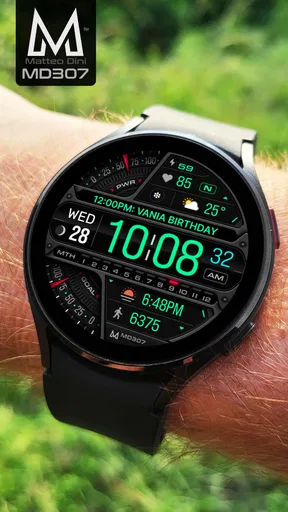
Our Review of MD307 Digital watch face
 Analysis by Appyee
I judge a watch face by how quickly I can get the information I need, whether I can make it feel like my own, and whether it still works for me after the novelty wears off. MD307 Digital is aimed at people who want a configurable digital look rather than a traditional dial. It is a Wear OS personalization app from Matteo Dini MD ® Watch Faces, priced at $1.99, and its Everyone age rating makes it suitable for a broad audience. My take is that its appeal lies less in a single signature trick and more in the chance to shape a data-rich face around your daily routine.
What the current experience is built around
The face is designed to put time and useful information together, with customizable complications as part of the experience. That makes it a different proposition from a very plain digital face: you can use the available space to bring chosen details closer, rather than treating the watch as a clock alone. The trade-off is familiar to anyone who enjoys customization: a face can become less calm and less readable if you try to show everything at once.
I would start with a practical layout, not a decorative one. Pick the details you check often, arrange the face so the time remains easy to notice, and wear it through an ordinary day before making more changes. That simple test helps distinguish a useful complication from one that only looked appealing while browsing settings. If your priorities change, you can adjust the arrangement instead of committing to a fixed design.
Why its release history needs a careful reading
MD307 Digital was released on Nov 3, 2022. That date gives the face some time in the Wear OS personalization space, but it does not by itself tell me what has changed since launch. I would not treat the original release as proof that every current device or software setup behaves exactly as it did then; nor would I assume a particular feature was added later without a clear version history to support that conclusion.
What I can say is that the product’s central idea remains straightforward: a modern digital watch face with configurable complications and multiple kinds of information. For an existing user, that means the most useful way to judge it is to check whether the face still fits the data and style they want on their watch now. For a new user, the release date is context, not a reason on its own to expect a specific update schedule or a particular level of future support.
Who is likely to get the most from it
I see the strongest fit for someone who already checks a smartwatch throughout the day and wants those glances to do more than show the time. A person who likes digital layouts, enjoys tuning colors or information placement, and knows which complications matter to them will have a clear reason to try it. It can also suit someone who wants one face that feels personal enough for work and everyday errands, rather than switching designs for every occasion.
It is less compelling if your ideal watch face is almost empty, if you prefer analog hands, or if you rarely look at anything beyond the time. A fixed, minimal face may be quicker to choose and require no decisions about what to display. I would also be cautious about buying it solely because you expect every complication to show identical information across all watches: the watch, Wear OS setup, and the complication provider can affect what is available.
How I would set it up for real life
Imagine leaving home in the morning with a busy schedule. The useful setup is not necessarily the one with the most data; it is the one that lets you check the time and your chosen daily indicators in one glance while you are walking between places. I would keep the most frequently checked information easy to find, then reserve less prominent positions for details I only consult occasionally. During a workday, that can reduce the need to open separate watch apps just to answer a quick question.
There is a small but important workflow advantage to setting the face up around habits rather than filling every available spot. For a few days, notice which information you actually seek and which areas you ignore. Then remove or replace the unused items. This is more useful than repeatedly changing colors without a reason, and it helps keep a feature-rich digital layout from turning into visual clutter.
How it compares with other watch faces
Compared with a basic digital face, MD307 Digital is a better match if you want more control over the information shown and enjoy adjusting the look. Compared with a highly decorated face, its practical appeal is the combination of a modern digital presentation and configurable details rather than ornament alone. The right choice depends on whether you want a glanceable dashboard or a quieter clock; neither style is automatically better.
There is also a useful distinction between a watch-face app and a collection of separate watch apps. A face can make selected information visible without requiring you to open each app, but it is not a substitute for the full functions of those apps. If you need to act on a detail, you may still need to open its source. I would choose MD307 for convenient at-a-glance information, not as a promise that every task can be completed from the face itself.
First Impressions: Sleek and Modern
The first thing that caught my eye with the MD307 Digital watch face was its sleek design. The minimalist yet sophisticated layout makes it a perfect fit for any occasion, whether you're heading to a business meeting or a casual day out. The color schemes are customizable, allowing you to match it with your outfit or mood, which is a neat touch.
Customization Galore
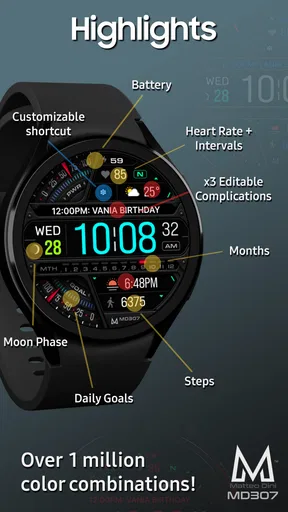
One of the standout features of this watch face is its level of customization. The app offers a plethora of settings that let you tweak everything from the color of the digital clock to the background pattern. You can also choose what information is displayed, such as steps, heart rate, and battery level. It's like having a dashboard on your wrist!
For those of us who love to personalize our gadgets, this feature is a game-changer. You can spend hours tinkering with the settings until you have the watch face that screams "you."
User Experience: Smooth and Intuitive
Let's talk about usability. The app interface is super intuitive. Navigating through the options is a breeze, and even if you're not tech-savvy, you'll find it easy to set up. The developers really focused on making it user-friendly, avoiding any unnecessary complexity.
Plus, the watch face itself is easy to read, with clear digits and icons. Even in bright sunlight, the readability remains top-notch, which is a huge plus for outdoor enthusiasts.
Battery Life: A Pleasant Surprise
Now, if you're worried about the watch face draining your battery, fear not. The MD307 Digital is optimized to be energy-efficient. In my experience, it didn’t noticeably affect the battery life of my smartwatch. This is a relief because nobody wants to charge their watch every few hours.
Compatibility and Performance
The app is compatible with a wide range of smartwatches, both Android and iOS. It runs smoothly without any lag, which speaks volumes about the developers' attention to detail. They’ve done a fantastic job ensuring that the app performs well across different devices.
Before purchasing, I’d check that my watch runs Wear OS and that the face appears as compatible with my particular device. The description identifies MD307 as a Wear OS face, so I would not assume that an iPhone alone can install it as a native watch face, or that every watch marketed as a smartwatch supports Wear OS. This distinction matters more than phone brand: the watch platform is the key consideration.
The Little Extras: Widgets and More
One of the things I love about this app is the little extras it offers. You can add widgets for quick access to your favorite apps or functions directly from the watch face. Whether it's checking the weather or launching your music app, these widgets make life a bit easier.
The ability to integrate with various apps means you can tailor your watch face to meet your specific needs. It's these thoughtful additions that really set the app apart from its competitors.
Useful checks before settling on a layout
When configuring a face with several information areas, I would check it in the situations where I actually rely on my watch: indoors, outdoors, and while moving. A layout that looks balanced while tapping through settings can feel crowded when glanced at quickly. If a complication is hard to read at a glance, moving it or dropping it is a better fix than adding more visual emphasis elsewhere.
I would also treat health-related figures as convenient prompts, not as a reason to judge the face itself. A watch face presents information supplied by the watch or connected functions; it does not make those measurements more meaningful simply by putting them up front. If a particular reading is important to you, check it in the relevant app and make sure the source is configured as you expect.
Price, reputation, and the buying decision
At $1.99, this is a paid personalization choice rather than a free default face. The price makes sense to me if you expect to use its customizable digital layout regularly; it is harder to justify if you are only curious about trying another design for a day. I would decide based on whether the information arrangement and style solve a daily annoyance, not simply on how many options sound appealing.
It has an average rating of 4.4 from around 12 thousand ratings, with roughly 1.9 thousand written reviews, and more than 100 thousand installs. Those figures suggest that plenty of people have tried it, but they cannot tell you whether it suits your watch model or preferred layout. I use ratings as a broad signal, then give more weight to compatibility and to the way I actually want my wrist display to work.
For existing users, the practical question is whether the face remains useful as routines and preferences change. If you already have a layout you like, there is no need to alter it just to explore every setting. If you are returning after changing watches or reorganizing your day, take a fresh look at which complications still earn their space. A paid face is most satisfying when it keeps serving a real purpose, not when customization becomes an end in itself.
Where I would be cautious
Customization can take time, and that is part of the appeal only if you enjoy making those choices. If you want a face that is ready immediately and never needs adjustment, the extra flexibility may feel like needless setup. Similarly, if the complication you care about is unavailable through your watch’s current setup, changing the design cannot solve that underlying limitation. I would confirm the options on the watch before building a routine around a specific data point.
My other caution is about expectations. A digital face can put information within easy reach, but a crowded arrangement can make the watch less effortless to read. I would not try to turn every glance into a dashboard check. Keep the time prominent, use only the details that genuinely help, and let the rest stay in their dedicated apps.
Final Thoughts
In conclusion, the MD307 Digital watch face is a fantastic choice for anyone looking to enhance their smartwatch experience. With its sleek design, extensive customization options, and user-friendly interface, it ticks all the right boxes. The added functionality and energy efficiency make it a no-brainer for anyone who wants their smartwatch to stand out.
So, if you're in the market for a new watch face, give the MD307 Digital a try. It's more than just a digital clock; it's an extension of your style and personality. Download it today and take your smartwatch to the next level!
What I would watch for over time
For me, the meaningful test is whether the chosen layout stays readable and useful after the first burst of experimentation. A watch face does not need constant redesign to be worthwhile. I would pay attention to whether the details I selected remain available on my setup, whether I can still read them quickly, and whether the face continues to suit the way I use the watch. Those are practical signs of fit, not promises about future changes.
MD307 Digital is best approached as a focused Wear OS personalization purchase: a digital look with room to organize information around your habits. If that is what you want, its paid price and configurable approach are easy to understand. If your priority is an almost blank display, an analog style, or broad compatibility beyond Wear OS, I would choose another option instead. For everyone else, I would set it up simply, live with the result, and keep only the details that genuinely earn a place on the wrist.
Verdict
Strengths of MD307 Digital watch face
- Sleek and modern design for any style.
- Highly customizable with numerous options.
- Battery efficient to maximize watch life.
- Clear and easy-to-read display.
- Compatible with various smartwatch models.
Limitations of MD307 Digital watch face
- Limited free features; premium unlock required.
- Occasional syncing issues with some devices.
- In-app purchases can add up quickly.
- May lag on older smartwatch models.
- Setup can be confusing for new users.
Other Releases by Matteo Dini MD ® Watch Faces
View All
MD242 Hybrid watch face
Personalization4.5

MD326 3D Modern Watch Face
Personalization4.6

MD170B Digital watch face
Personalization4.6

MD338 Hybrid watch face
Personalization4.6
Similar Picks in This Category
View All
Microsoft SwiftKey AI Keyboard
SwiftKey4.3

Wallpapers
Google LLC4.1

Zedge™ Wallpapers & Ringtones
Zedge4.7

Yandex Browser with Alice AI
Direct Cursus Computer Systems Trading LLC4.3

Ringtone Maker:create ringtone
Big Bang Inc.4.7

Fonts Keyboard
Fonts Keyboard3.9
Frequently Asked Questions
What features does the MD307 Digital watch face offer?
The MD307 Digital watch face provides a sleek, customizable interface for your smartwatch. It includes features like multiple color themes, dynamic weather updates, battery status, and step tracking. Users can also customize the display to show the time in either 12-hour or 24-hour formats, making it versatile for different preferences.
Is the MD307 Digital watch face compatible with all smartwatches?
The MD307 Digital watch face is primarily designed for Android Wear OS devices. Before downloading, ensure that your smartwatch runs on Wear OS, as compatibility with other operating systems like Apple's watchOS may not be available. Always check the app description for specific device compatibility details.
How can I customize the MD307 Digital watch face settings?
Customization is straightforward with the MD307 Digital watch face. Users can access the settings directly through their smartwatch or via the companion app on their smartphone. From there, you can change the color themes, adjust the display settings, and configure which widgets or information you want visible on your watch face.
Does the MD307 Digital watch face impact battery life?
While the MD307 Digital watch face is optimized for performance, enabling features like dynamic weather updates and step tracking can affect battery life. To minimize battery usage, consider adjusting settings or disabling features that are not essential for your daily use. The app provides options to optimize performance without drastically draining your battery.
Is there customer support available for the MD307 Digital watch face?
Yes, customer support is available for users of the MD307 Digital watch face. You can contact support through the app’s official website or directly via the app store where the watch face was downloaded. Support typically includes troubleshooting assistance, updates, and guidance on maximizing the functionality of your watch face.
